 Tessel libraries
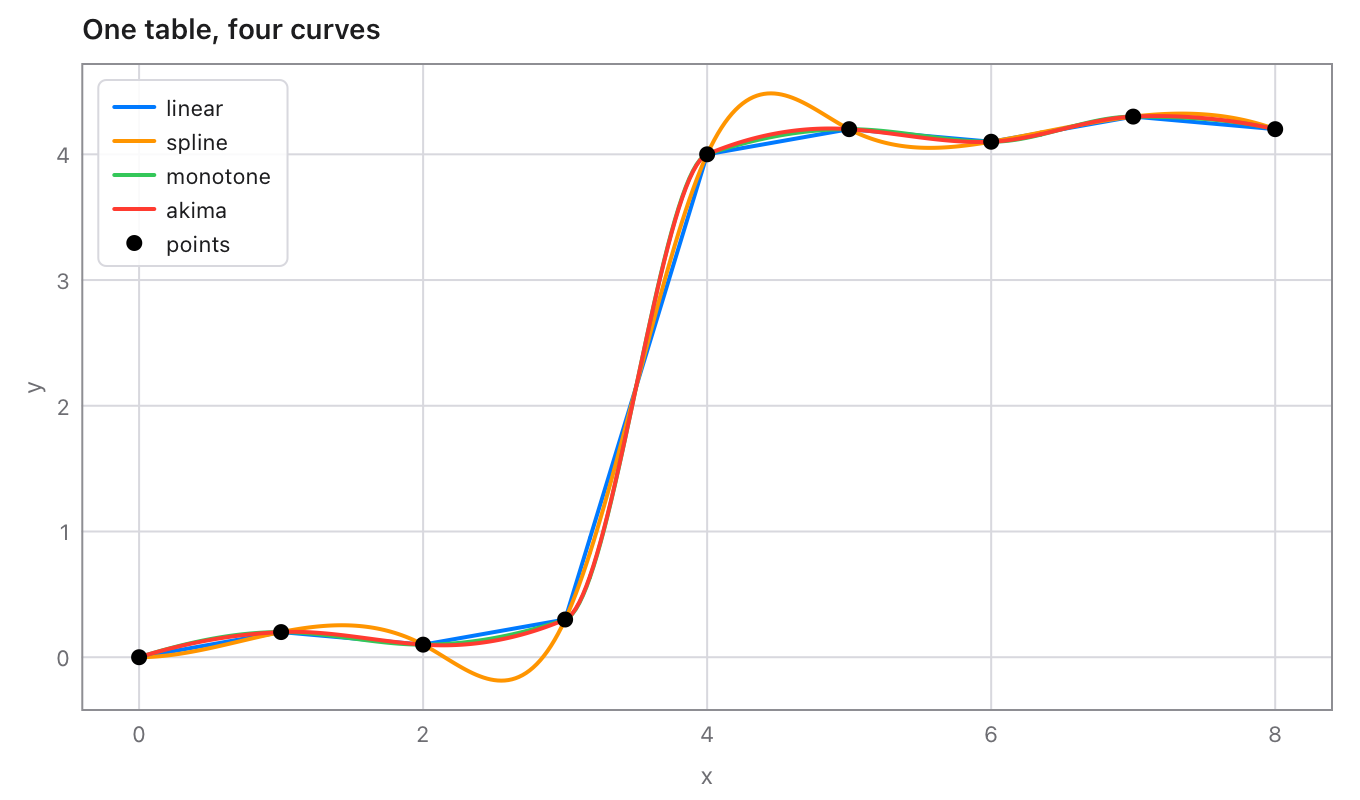
Interpolation for Tessel programs: values between the points of a table, by straight lines, smooth splines, a curve that keeps the data's shape, Akima's curve or steps, and two-way tables. Every curve also gives slopes, areas, and the x for a y (reading a table backwards). The curves are the same as SciPy's, checked on 900 random tables.
import interpolate

fn main() {
    // A rating table: discharge (m³/s) for water depths (m).
    let depth = [0.5, 1.0, 1.5, 2.0, 2.5]
    let flow = [8.2, 23.0, 42.5, 66.0, 93.1]
    let rating = interpolate.monotone(depth, flow)
    print(rating.at(1.2))                    // the flow at 1.2 m
    print(rating.xFor(50.0) ?? 0.0)          // the depth for 50 m³/s
}
30.241090785815985
1.6691580566455806
Using it
Add it to a project (Tessel 0.8 or later):
tessel add interpolate
then import interpolate.
Making a curve
Each takes the xs and the ys of the points (in any order; they're sorted
by x) and gives an Interpolant.
| Function | The curve |
|---|---|
linear(xs, ys) |
Straight lines from point to point, as when reading a table by hand. |
spline(xs, ys, start:, end:) |
The smooth cubic spline: no jumps in slope or bending. |
monotone(xs, ys) |
Smooth, and keeps the data's shape: rises where the points rise, falls where they fall, never overshoots a point (SciPy's PchipInterpolator, MATLAB's pchip). The safe choice for tables like rating curves. |
akima(xs, ys, modified:) |
Akima's curve: each point's slope leans towards the steadier side, so an odd point doesn't send waves along the curve. modified: true is the modified Akima curve (MATLAB's makima), which also keeps flat stretches flat. |
steps(xs, ys, step:) |
Flat between points: the value of the point before (.previous, the default), after (.next), or the nearer one (.nearest). |
A spline's ends are .notAKnot unless you say (as in SciPy and MATLAB):
start: / end: |
|
|---|---|
.notAKnot |
The last three points' pieces are one cubic. |
.natural |
No bending at the end (second derivative 0). |
.slope(value: v) |
The slope there is v. |
.bending(value: v) |
The second derivative there is v. |
let s = interpolate.spline([0, 1, 2, 3], [0, 1, 8, 27])
print(s.at(1.5))     // 3.375000000000001: not-a-knot is exact for a cubic (1.5³)
let n = interpolate.spline([0, 1, 2, 3], [0, 1, 8, 27], start: .natural, end: .natural)
print(n.at(1.5))     // 3.1500000000000004
Outside the points
Every function takes outside:, what the curve gives beyond the first and
last point:
.extend |
Goes on with the end pieces' own lines or curves (the default, as in SciPy). |
.hold |
Keeps the end values: flat beyond them (the default for steps). |
.nan |
NaN: no value there. |
Using a curve
Method of Interpolant |
Gives |
|---|---|
at(x) |
The value at x. |
values(xs) |
The value at each of xs. |
slope(x) |
The first derivative at x. |
secondDerivative(x) |
The second derivative at x. |
integral(from:, to:) |
The area under the curve between two xs. |
xFor(y) |
The first x between the first and last point where the curve has the value y, or nil. |
xsFor(y) |
Every such x, smallest first. |
It also has the points it was made from, xs and ys, and kind
("linear", "spline", "monotone", "akima", "makima" or
"steps").
// A flood hydrograph (m³/s every 6 hours): its volume in m³.
let hydro = interpolate.linear([0, 6, 12, 18, 24], [20, 80, 310, 520, 450])
print(hydro.integral(from: 0, to: 24) * 3600.0)      // 24732000.0

// Where a wave is at 0.5.
let wave = interpolate.spline([0, 1, 2, 3, 4], [0, 1, 0, -1, 0])
print(wave.xsFor(0.5))       // [0.22360044628468784, 1.6101921598341777]

// An electricity tariff: the rate from each threshold on.
let tariff = interpolate.steps([0, 100, 500], [8.0, 9.5, 11.0])
print(tariff.at(250))        // 9.5
Two-way tables
grid(xs, ys, zs) holds a value for each pair of an x and a y: zs has a
row for each x, with a value for each y. Its at(x, y) interpolates
between the four values around (bilinear, as SciPy's
RegularGridInterpolator), and it takes outside: too.
// Values for x = 0, 10 (rows) and y = 0, 1, 2 (columns).
let g = interpolate.grid([0, 10], [0, 1, 2], [[1, 2, 3], [11, 12, 13]])
print(g.at(5, 1.5))          // 7.5
Mistakes
Points that can't make a curve stop the program with a message, like
interpolate: spline: two points have x = 2.0: xs and ys of different
lengths, fewer than 2 points, a NaN or infinite value, or two points
with the same x. Check data read from a file first with
interpolate.problem(xs, ys), which gives the message or nil:
print(interpolate.problem([1, 2, 2], [5, 6, 7]) ?? "fine") // two points have x = 2.0
From version 0.1
interpolate(p1:p3:y2:) and Point are still here, unchanged: the x on
the straight line through two points at a given y.
let a = interpolate.Point(x: 10.0, y: 100.0)
let b = interpolate.Point(x: 20.0, y: 200.0)
print(interpolate.interpolate(p1: a, p3: b, y2: 150.0))   // 15.0
For a whole table, linear(xs, ys).xFor(y) does the same over every
pair of points.
Speed
A curve's pieces are worked out once when it's made; each value is then a binary search and a cubic. On an Apple M5 Pro, a spline through 10 000 points is made in under a millisecond, and a million values take 0.04 s.
Tests
tessel run tests
checks the library against SciPy on 900 random tables (750 curves of
every kind and end, 150 grids: 40 900 values, slopes, second
derivatives, areas and crossings, inside and outside the points), then
the API by hand. python3 tools/oracle/oracle.py makes the cases again
(tests/cases.json; it needs numpy and scipy).
What's where
| File | |
|---|---|
fit.tsl |
linear, spline, monotone, akima, steps, problem, and End. |
curve.tsl |
Interpolant and its methods, Outside and Step. |
grid.tsl |
Grid and grid. |
interpolate.tsl |
0.1's Point and interpolate(p1:p3:y2:). |
tests/ |
The tests and the cases from SciPy. |
tools/oracle/oracle.py |
Makes the cases from SciPy. |
docs/curves.png |
The picture above. |
Licence
MIT: see LICENSE.